Space Knight Project Page
Project Purpose & Design Goals
- My core goals of this project was to design a minimum viable product and then develop it further, iterating with each build based on rapid prototyping and rigerous playtesting.
- I aimed to explore various data driven game design approachs throughout the project and wanted to inform changes and developments of the game with qualitative and quantitative data gathered.
- I wanted to learn how to effectively balance a game I had scripted myself from scratch and continuously iterate until it reached my intended design and player experience goals.
Focus:
Data Driven Game Design
Date:
October 2020 – December 2020
Engine:
Unity 2D
Design Process
Below you can find an overview of my design process I underwent towards the creation of Space Knight.
Research
As my weakness at the time was scripting I wanted the focus of this project to be on improving my scripting capabilities by creating a small gameplay prototype with three levels from scratch, and then once I achieved the minimum viable product I wanted to hook up some data collection methods and playtest to collect data to iterate on. So I started this project performing research into several methods of data collection within games that were readily available to me. Through this I tought myself Unity analytics and using scripts to store player quantitative data in excel sheets I also learned how to send them via email.


I also did research into various games that I could base some simple core mechanics off of to rapidly get an MVP off the ground to start collecting data. Through creating a few moodboards of the mechanics from games that inspired me and would be excellent for gathering data with I set out a few mechanics I could get started with and iterate on over time. I decided to go for an asteroids game but one where the player had more control over their movement and had to explore the area, complete objectives and return to their ship.


Digital Prototyping & Testing
Using my research I got started in engine, putting together the core mechanics and hooking up data collection through scripts and Unity Analytics.
It was also through this stage where I encountered a problem, the data I was collecting were all sent through individual excel files, but to intepret the data I had to setup a dashboard for myself, this required a lot of data entry as I transfered data from the excel sheets to a dashboard and was very innefficient. Unity Analytics dashboard was also a good solution, but I wanted a bit more control over it.

So I researched methods of alleviating this burden and managed to use the Google Api’s integration with Unity to transfer all of my data directly to google sheets!


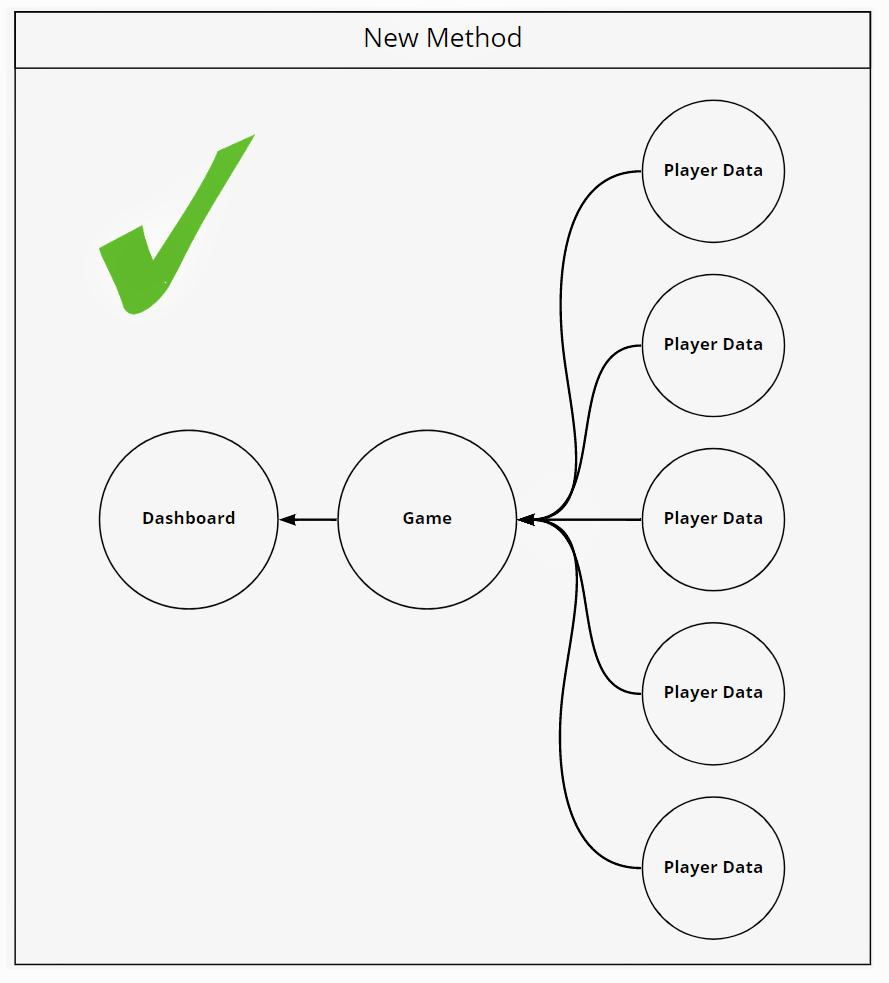
And with this I re-worked my dashboard with all of my key performance indicators and player telemetry to take account of the change in data transfer and started setting up data interpretation methods. I also setup three sheets to store data in, one for each level to seperate data accordingly.

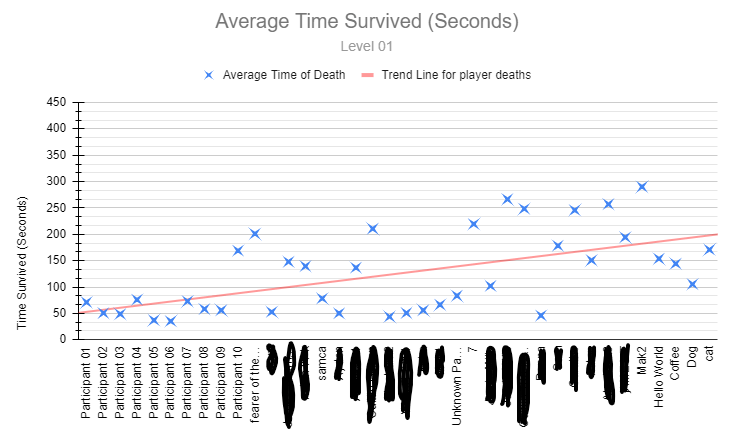
I synthesized collected data to calculate averages accross my KPI’s for each level to better understand if I was getting closer to my design goals through improving player survival rates and level completion times.
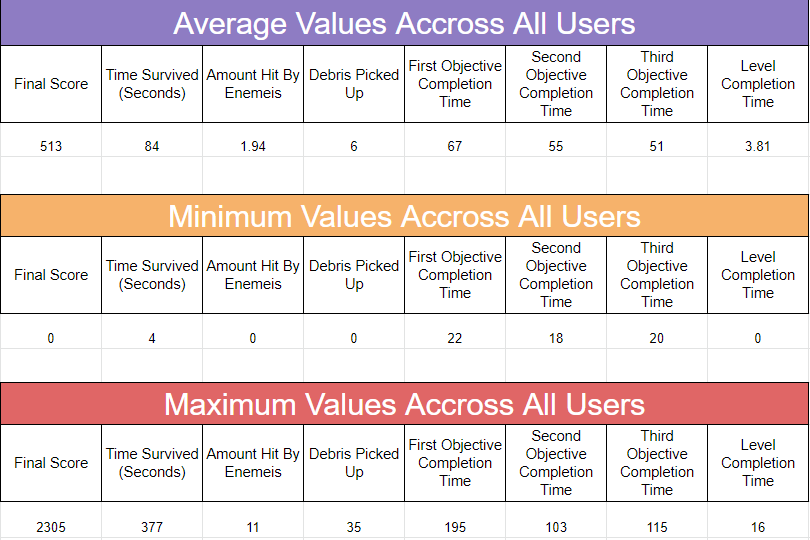
I intepreted this data through bar charts, scatter graphs and pie charts to better visualise quantitative data collected and understand choke points and issues.


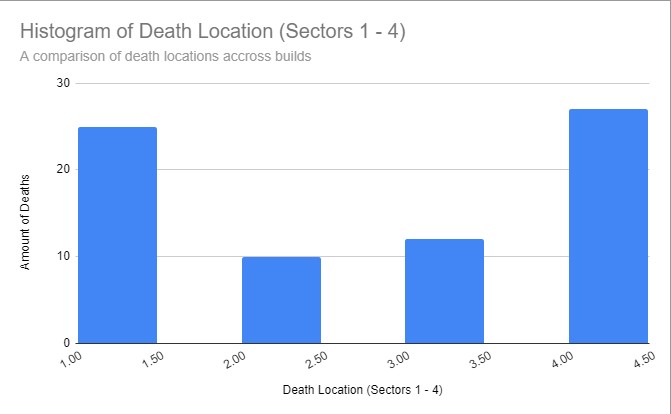
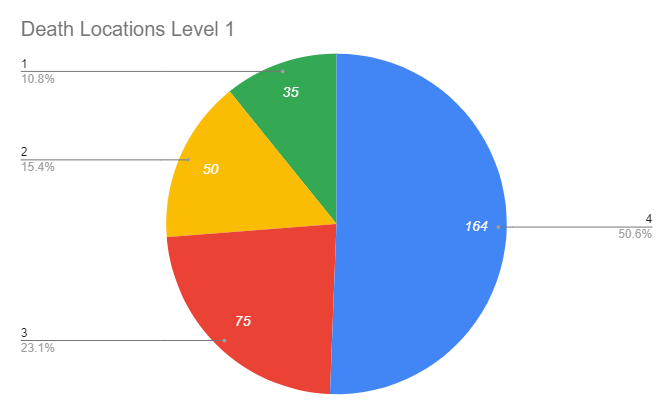

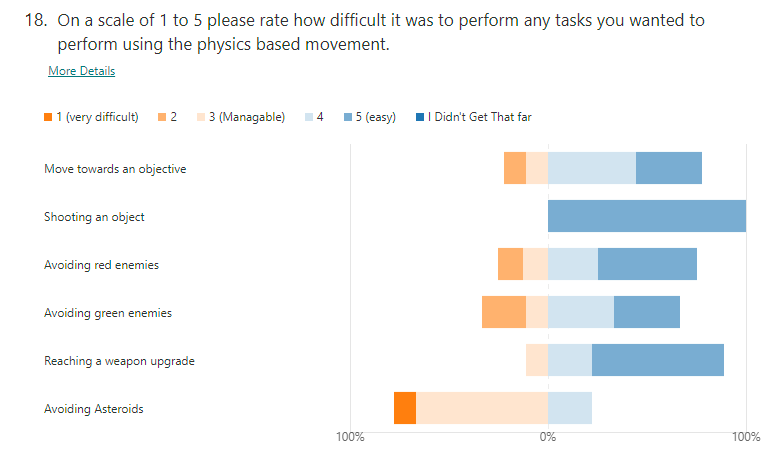
I was also collecting player qualitative data alongside this through Microsoft Forms in which the players answered questions regarding how the game felt in certain aspects, where the player felt the difficulty stemmed from and questions relating to their general experience for each version. I also made sure to include some questions only applicable to recurrent players.




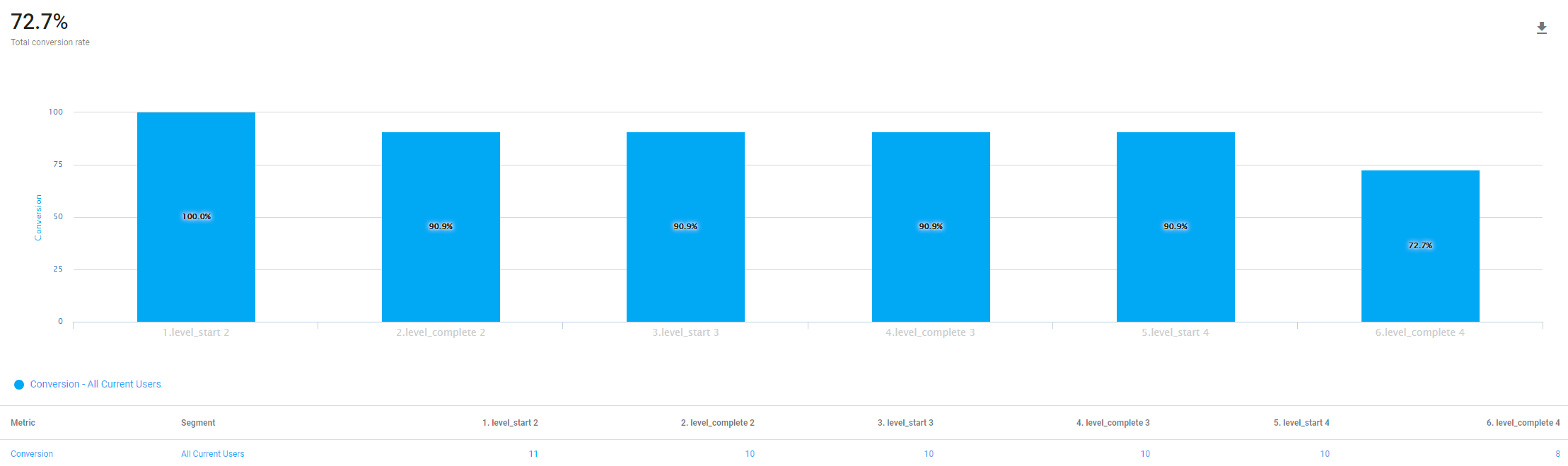
To help track player conversion rates I also used Unity Analytics to create a funnel that would track player drop off rates and in which level it happened. Allowing me to analyse the level giving players the most trouble and redesigning it.

Rapid Iteration
I would use the collected data from the current build to directly influence the design and development of the prototype. Rapidly iterating on feedback, re-balancing mechanics such as the players projectiles, player movement and asteroid health to implementing new mechanics such as a weapon upgrade system, objective trackers, updated asteroid spawn systems, a shield and new types of enemies. To improve oboarding new players I also implemented an animated tutorial within Unity.
Overall I made four builds of the game, each one markedly improving on the pevious through rebalancing mechanical values, adding new mechanics and systems and restructuring the level order to reach my intended player experience goals.
Below are the links to view each of the qualitative data summaries for my first three builds.
Qualitative Summary 1

Qualitative Summary 2
Qualitative Summary 3
What I Learned
Below is a short summary of my key takeaways from the project and the things I learned through it’s prototyping & testing.
- I learned how to rapidly digitally prototype to create a small collection of mechanics through C# for an MVP and developed further with more mechanics and 3 levels, each increasing in difficulty.
- I wrote scripts that collected player quantitative data (deaths, time spent alive, enemies killed etc) and sent them via email as an excel document. I developed this further with the Google API and created my own live dashboard on google Sheets where my KPI’s would be sent automatically for each level.
- I learned how to analyse and interperet collected data through a range of bar charts, pie charts and scatter graphs comparing KPI’s and used this to inform all game design decisions with each iteration to improve onboarding and retention.
- I also learned how to setup and use Unity Analytics to help collect and interpret data with funnels and conversion charts and track custom events accross DAU and MAU KPI’s .
- I learned how to use Unity’s animation tools to rapidly implement a new player tutorial for improved player onboarding.
 Michael Hutchison